.svg?fit=max&auto=format&n=NcRYOCfKJkO5rLTb&q=85&s=fd0faab3fa561bdd2e9b10fd042c5bf0)
Key Features
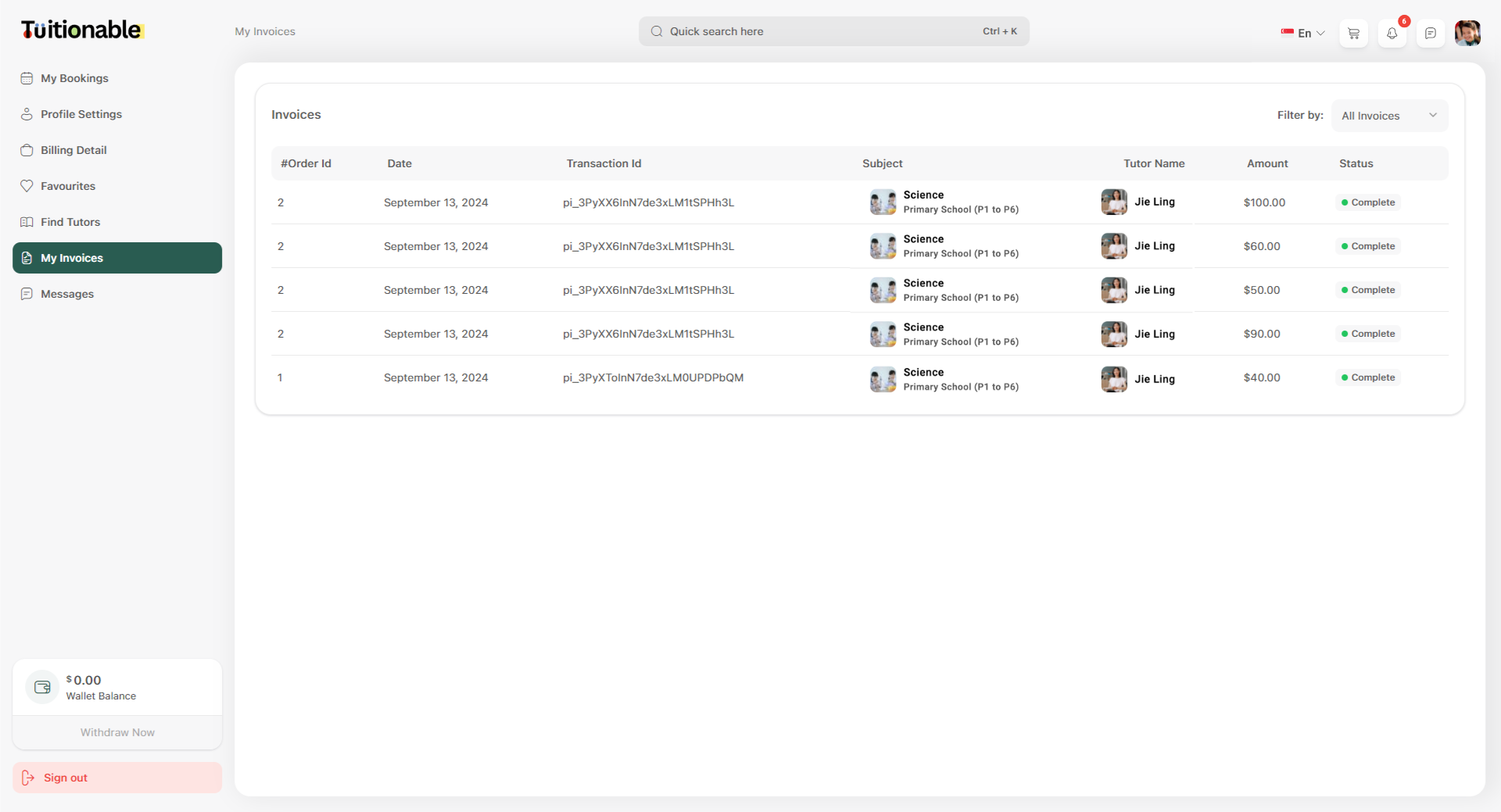
- Invoice Overview:
- Order ID: A unique identifier assigned to each invoice.
- Date: Displays the date the transaction was processed.
- Transaction ID: A specific reference code for payment identification.
- Subject: The course or subject name booked for the session.
- Tutor Name: The tutor associated with the session.
- Amount: The total cost paid for the session.
- Status: The completion status of the transaction (e.g., Complete).
- Filter Invoices: Use the Filter by dropdown menu located at the top-right to view invoices based on specific criteria, such as:
- All Invoices
- Completed
- Pending
- Visual Layout: Each row of the table clearly separates details for easy readability, including the subject, date, tutor, and payment status.
Steps to View Invoice Details
- Navigate to the Invoices section in the student dashboard.
- Review the list of transactions displayed in the table, organized by Order ID.
- Use the Filter option to refine the list based on invoice status.
Invoice Table
Below is an example of the Invoices table showcasing transaction details: