.svg?fit=max&auto=format&n=NcRYOCfKJkO5rLTb&q=85&s=fd0faab3fa561bdd2e9b10fd042c5bf0)
Reason for Reschedule
Tutors may reschedule sessions due to various reasons. When this happens, the system ensures students are notified of the change and provides a seamless way to reschedule or opt for a refund. This ensures student registrations remain preserved while minimizing disruption.Steps to Reschedule Your Session
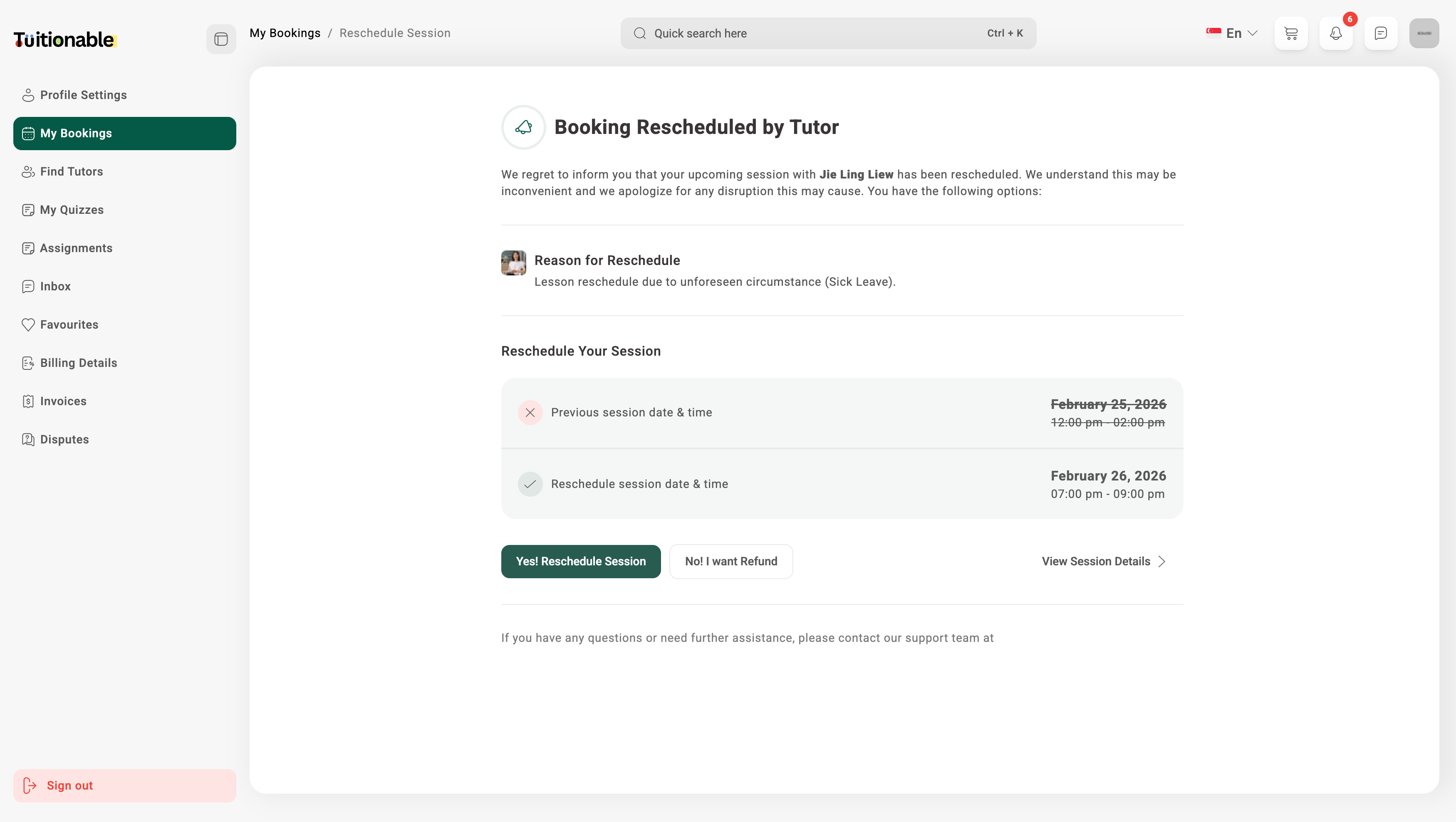
- Review Changes: Compare the previous and rescheduled session details, including:
- Previous Session Date & Time: December 17, 2026, 01:00 pm - 02:00 pm (cancelled).
- New Session Date & Time: December 18, 2026, 01:00 pm - 02:00 pm.
- Options Available: Students have the following options:
- Click on the Yes! Reschedule Session button to confirm the new session date and time.
- Alternatively, click on the No! I want Refund button if you prefer a refund instead of rescheduling.
- View Session Details: Use the View Session Details link to review additional information about the session.
Support and Assistance
If you have questions or require further assistance in regards to rescheduling, please contact our support team for help.Example Interface
Below is an example of the Reschedule Session interface, showing previous and rescheduled session details: